
Backing up the WordPress Database

DarkerView is a substantial part of who I am. Recorded here are my writings, photos and experiences spanning years. A personal diary recording so much of my life. While my blogging effort goes back to 2005, it is only the last few years that are hosted on the newer WordPress based DarkerView. Still, I worry about losing it all, this would be a stunning blow, not something I wish to contemplate. Thus I make an effort to back everything up.
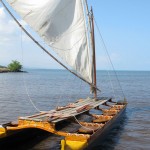
Hawaiian Double Hulled Canoe
A Hawaiian double hulled canoe awaiting a crew below Pu’ukohala Heiau
I use a plugin called, simply enough, WordPress Database Backup. The plugin is easy enough, just a few settings to make.

The settings are fairly stright forward to figure out… You can choose to exclude storing post revisions and any spam comments you may have not yet deleted. Any optional tables, not part of the basic WordPress setup, can be included. You can choose to set up an automatic backup at several different time intervals.

The plugin also gives you a few choices in what to do with the backup file. The backup can be stored on the same server as the site, emailed to the specified address, or simply downloaded to your local computer. I generally trigger my backups manually and download them to my local machine for storage at home.

The result is a compressed file containing the necessary SQL code needed to recreate the entire WordPress database. For DarkerView, a three year old blog with almost one thousand posts, the resultant backup file is just over a gigabyte.

Unpacking and perusing the resultant backup file is interesting. Laid before you is the entire structure and contents of the site in SQL query statements. In the case of DarkerView this currently results in over sixteen thousand lines of SQL. Not having really looked at the back-end database before it is quite interesting to examine.

The backup file does not include the uploaded files, the images and thumbnails. It is necessary to copy this section of the blog manually. This is easily accomplished with an FTP session opened to the hosting computer and a single copy command.

Darker View’s Top Posts of 2012

Looking through the site statistics is an interesting exercise. I get a chance to see what people are reading. The vast majority of readers do not write comments, the stats are the best tool for feedback I have. Perusing the stats is also an realization of one’s own vanity, a necessary motivation for all writers, not just bloggers.

Site traffic has taken a large hit with the transfer to the WordPress platform. I expected this, there would inevitably be loss of links and search engine traffic with the changeover. This has begun to recover, but very slowly. There have been 55 thousand views of the Darker View blog in 2012. Overall there were 66 thousand views of the entire site for the year, not just the WordPress material. This compares to 91 thousand visitors in 2011, about two-thirds of pre-changeover traffic. Total traffic to Darker View since inception in 2007 is now over 288 thousand visitors.

Continue reading “Darker View’s Top Posts of 2012”

Dealing With the Old Darker View

How do I fold all of the legacy parts of Darker View into the new format?

Not easily.

Slowly, I hope to move all of the legacy information in the old darker view site onto the WordPress platform. The first goal is to deal with the old static HTML pages that existed beside the blog. These pages have an ancient heritage, at least by web standards. They are fragments of the website I began almost twenty years ago, the old WhitethornHouse.com. Much of this was ported into the blog when the website was converted in 2007. At one point the whole thing was seamless, the blog integrated with static HTML pages, integrated with a batch of PHP scripts to dynamically create the observing database.

Right now the thing is just a mess.

The goal is to achieve the same seamless appearance. First to import all of the old static pages into WordPress as either posts or pages within the WordPress database. This requires some method of redirecting the old pages to the new locations when a 404 error occurs. To this end I have borrowed and modified a custom PHP script to automate the 404 page. With this I can map any deleted pages to the new location.

I hope.

Actually, it seems to work reasonably well. With this I can begin the process of deleting the old material as it is imported into the new format, without abandoning all of the old links to my site that exist across the net.

Expect problems. Expect dead links that will eventually get corrected as the material posts to the new site. Expect to see old articles posted as new on the new site, that material I deem worth preserving. This will be a long process as I slowly, page by page, move the material across and get the links re-mapped.

Bear with me. Thanks!

WP Plugin Confusion

The world of WordPress plugins is a stew of confusion to a new WordPress user. Thousands of options are available for use with your blog, an amazing array of interesting features to add useful capabilities. From this, you are trying to choose what works for you. You really do need a few plugins to add key features.

For Darker View there a number of things I have determined I need to get working… Spam comment filtering, backup capability, statistics, social site support, threaded comments, and a decent photo gallery. I have the backup utility working now using the very nice WordPress Database Backup by Austin Matzko. Social site functions and statistics from Jetpack work smoothly.

The latest experiments center around getting a decent gallery function integrated. Two options appear to be worth considering… NextGEN Gallery seems to be the standard, but I had read that it was flash based, and I want things to work on an iOS device. In a later experiment I found that it does work on my iPad, so it is back on the list.

In the meantime I have experimented with DM Albums. This is a straightforward plugin with a decent interface. Just load the photos and put a single tag into the post. I like the effect, it seems to play well with my theme. The result is a nicely functional gallery.

DM Albums does have some sizing issues in the full screen mode, pretty annoying issues. The package has seen very active development lately, with two major releases already this year as they clean up the bugs and get everything working. Thus I am not giving up on this package just yet.

This issue is not done yet, I am just out of time to play with it for now.

[dmalbum path=”/wp-content/uploads/dm-albums/Hawaii 100/”/]

Style.css and Templates

I have spent much of the day, between doing yard work, working on the style sheet for Darker View. I have solved a few little issues, put a header image in place, and learned a great deal about the intricacies of CSS and WordPress. I still have some problems with tables and the favicon, I will just attack the issues one-by-one.

I have also learned a bit about WordPress templates, making a few modifications here and there. Good progress, the whole thing is looking much better.The major bug of the Blogum theme seems to be putting a ‘Read More’ at the bottom of every post, even if it has nothing else to read. This one will be a challenge. Otherwise I have figured out date formats and many of the other WordPress function calls.

If you have any comments or suggestions, please comment!

Update… The Read More bug is fixed!

Mucking About in Themes

Yes, I have changed the theme. Sorry.

The theme currently displayed is Blogum. I think this is the way I want to go. The original appearance was back on white. Not really appropriate for a blog called Darker View. I have edited the CSS for a gray on black appearance closer to the original DV. A few things do not work quite right, particularly the tables I had so neatly laid out for the earlier theme. Just more work ahead, bear with me.

Site Appearance

Yeah, I am not happy with the appearance of the site either.

The current theme just has a number of annoying “features” that just bother me. I am experimenting with another theme, one with an even cleaner and more minimalistic layout. So expect the appearance to change some time. In the meantime if you happen to stop by Darker View late some night to see an entirely different look… It is just me working on another layout.

Darker View is now on WordPress

It has been a decision that has been brewing for quite some time.  I have changed Darker View over to using WordPress as the underlying software.

For the last four years Darker View has run on Serendipity (known as S9Y) as the underlying blogging software.  The software has served me well, it is easily customizable and has proven quite stable.  Unfortunately it is also beginning to show some signs of wear.  It is getting slower and slower as the size of Darker View’s databases have grown.  Any number of new technologies and features I would like to add to DV are not available.

Serendipity is not supporting the blogging community to the degree that WordPress is.  The development behind WordPress has reached such an overwhelming critical mass that it is hard not to make this switch, if just to avail myself of the features and support available from the WP community.

When my father asked me to setup a blog for him I knew I would use WordPress to do it.  Using WP to setup NordicQuest.com allowed me to get a good hands-on look at the software.  I was expecting a good experience, what resulted was even better.  I was consistently pleased with the features and ease of use offered by WP.  This cemented my decision to convert Darker View to WP as soon as possible.

This will not be without a lot of pain.  There are over 2350 postings, hundreds of images, and a lot of history contained in the databases of Darker View.  I have attempted twice to automatically convert the mass of material contained in the S9Y databases to WP.  Both attempts were dismal failures, resulting in a couple FTP and SQL sessions needed to delete and clean up the resulting morass.  Thus I have simply setup a clean WP install and started afresh.  I will probably make an effort to cut and paste the most significant articles over to the new platform.

I will leave the old blogging software in-place for now.  All of the old links and articles will remain online.  Fortunately the choices I made when structuring the site years ago when installing S9Y will allow me to run both blogging packages in parallel.  But for 2012, all new material will be on the WordPress platform.

Better with a Photo

Blog posts just read better when a photo is included. While a psychologist might argue, my guess is that the effect of a photo is due to our visually oriented minds. We simply like photos, the images give an immediate context for the article that is processed before we even complete reading the first sentence.

Quarter Moon
A 53% illuminated waxing Moon, afocal w/Canon G11, TV-102 & 32mm Plössl
The photo can be anywhere in the posting, to either side, across the bottom, as long as it is visible with the top of the article. It helps if the blog layout is clean, without too much visual clutter from other images or advertisements. Even worse is a background image that distracts from the primary article and images.

The extreme example are blogs that include a photo no matter the subject. One of my favorites is Photo Attorney by lawyer Carolyn Wright. This is a great blog covering the legal aspects of copyright law and the business of photography. Carolyn often includes a photo with every post. And while the post covers some legal aspect of photography the image is usually a dramatic wildlife photo taken by Carolyn. The juxtaposition is sometimes interesting, hawks or lions while talking about courts and plantiffs. There is no denying the effect of the photo, you just want to read the posting.

I make it a practice to include a photo in most postings. Even if it means reusing a photo that has been published before. After a while any blog begins to accumulate quite a collection of photographs. This provides a ready set of “stock” photos which can be used to illustrate any posting.